/* Google Analytics =================================================== U7 */ /* Google Analytics =================================================== U7 */
Showing posts with label BYOD. Show all posts

Wednesday, March 27, 2013

Top 5 BYOD Blunders When Trying To Realize The Productivity Potential Of Workers Bringing Their Own Devices To Work


Top BYOD Blunders When Trying To Realize The Productivity Potential Of Workers Bringing Their Own Devices To Work
Top 5 BYOD Blunders When Trying To Realize The Productivity Potential
Of Workers Bringing Their Own Devices To Work

Blunder # 1 - No pre planning
Some companies just think – ‘oh people are using their cellphones at work, ok let them use the company network and we will see how it goes and deal with the issues as they arise’. Companies that just open their networks to BYOD without a plan will have real security problems, and they will probably issues that will not be easy to fix or deal with as they arise.

You need to ask questions like:

      Who do we want to use the network?

      Do we want to control access to data or the network based on job function?

      Do we have enough network resources for the additional load?


Blunder # 2 - No BYOD policy

A BYOD policy sets the terms and conditions in which an employee may use a device on the network. These policies can state which activities and apps can be used on the network. A good example of a BYOD policy template is here:


Blunder # 3 - Give access to all data


Networks are set-up with different level of access, and can be configured based on a user by user base. Organize your network so data is only accessed by those who really need it, not everyone on the network.

BYOD seems like a big problem, but real productivity gains can be had if BYOD is implemented correctly. Take it in small steps and remember to focus on data and the user. BYOD is the future of IT, but it will take time and effort to implement it correctly.

Network Security - Top BYOD Blunders When Trying To Realize The Productivity Potential of BYOD

Blunder # 4 - Device selection
 
Most people don't want to be told what phone or tablet they can use, but it does make a difference for security and performance of the network. Do your research, and publish a recommended list of devices that offer the security and network features that are critical to your network maintaining a high security level.


Blunder # 5 - Lost devices

People lose their phones and tablets all the time. They are often stolen and the phones are then hacked and all data is accessed. Large MDM system allow IT departments to wipe the phones data remotely, and some apps like Tigertext can remote wipe messages as well setting text messages to auto-delete.

Top 5 BYOD Blunders When Trying To Realize The Productivity Potential of BYOD


Tuesday, February 26, 2013

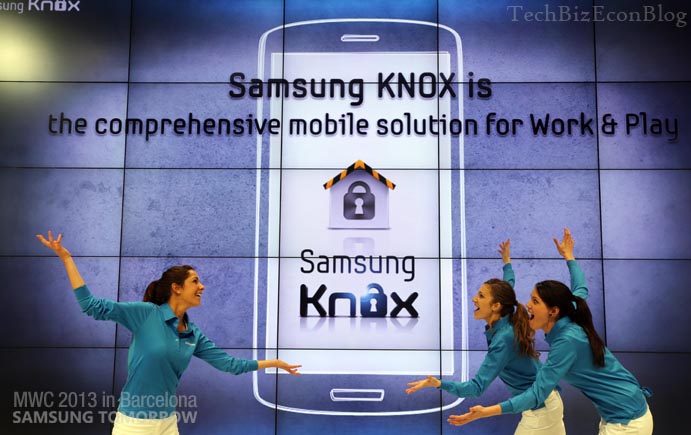
Samsung Releases Its Comprehensive Mobile Solution For Work and Play - Called KNOX™ - It Offer a Complete Lifestyle Package for BYOD

Samsung Releases Its Comprehensive Mobile Solution For Work and Play - Called KNOX™ - It Offer a Complete Lifestyle Package for BYOD


Samsung entered the BYOD enterprise space with its SAFE Enterprise program which it touted as “solutions that include the necessary security and feature enhancements suitable for business use.” SAFE has had a reasonable reception in the IT community, but has really been focused on the Enterprise side of Bring Your Own Device (BYOD)

At this year’s Mobile World Congress, Samsung announced that it has taken its BYOD offerings to the next level by add some extra layers of security and usability features and calling the new program KNOX.

Samsung KNOX will now offer a ‘container solution’ that separates work and play on your smartphone. Samsung stated that this will be easily accessible from the KNOX icon (container) on the home screen and will feature applications and solutions that users need for work.  In essence it is a complete lifestyle package for work, life and play.

Some of the apps will include email, contacts, calendar, file sharing, collaboration, a browser and more. KNOX container will present these in a secure environment and keep the personal and work side completely separate, which is what most IT departments will find as the key selling point.

Even though KNOX gives the IT department and users what they want, Samsung also made sure this will work for the developers as well. According to details provided, Samsung KNOX will be able to allow existing Android apps to “gain enterprise integration and validated, robust security with zero change to the application source code.”

Samsung has positioned KNOX as an end-to-end solution that is easy for all sides to integrate and satisfied the User, IT departments and App developers.

So far Samsung has not offered the key details such as exactly when it will be available and what costs will be involved, but what we have seen is that KNOX will be “commercially available in selected Samsung GALAXY devices” beginning in the second quarter.

We may get more info on KNOX when the Galaxy S IV is announced on March 14 in New York City. 


More info here:

http://techbizplanet.wordpress.com/2013/02/25/the-new-samsung-galaxy-s-iv-will-be-unveiled-on-march-14th-2013-in-new-york-city/

Mobile World Congress - Samsung Releases Its Comprehensive Mobile Solution For Work and Play - Called KNOX™ - It Offer a Complete Lifestyle Package for BYOD